
State Transition#
Overview#
At any given point in time, the data stored by each application (and more broadly, the entire platform) is in a specific state. State transitions are the means for submitting data that creates, updates, or deletes platform data and results in a change to a new state.
For example, Alice may have already added Bob and Carol as friends in DashPay while also having a pending friend request to Dan. If Dan declines the friend request, the state will transition to a new one where Alice and Bob remain in Alice’s friend list while Dan moves to the declined list.
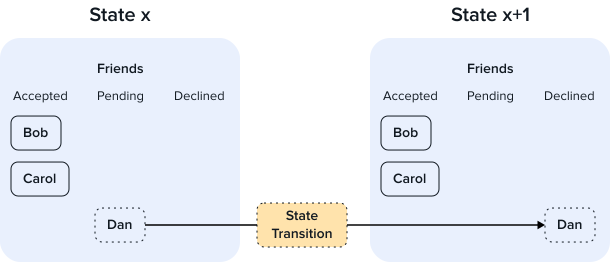
State Transition Example#
Implementation Overview#
To ensure the consistency and integrity of data stored on Layer 2, all data is governed by the Dash Platform Protocol (DPP) which describes serialization and validation rules. Since state transitions are the vehicle for delivering data to the platform, the implementation of state transitions resides in DPP alongside the validation logic.
Structure#
To support the various data types used on the platform and enable future updates, state transitions were designed to be flexible. Each state transition consists of a:
Header - version and payload type
Payload - contents vary depending on payload type
Authorization - authorization data for the header/payload
Authorization varies by transition family. Transitions submitted by an identity are signed with one of that identity’s keys. Transitions that spend from Platform addresses instead use a witness signature for each address input. Shielded pool transitions use the authorization included in their shielded actions and, where applicable, address witnesses or an asset-lock signature. Shield from Identity is also signed by the identity whose balance supplies the credits.
The following table contains a list of currently defined payload types:
Payload Type |
Payload Description |
|---|---|
Database schema for a single application |
|
Batch ( |
An array of 1 or more (currently limited to exactly one per batch) transition objects acting on documents or tokens. See Batch transitions below for the available actions. |
Identity Create ( |
Information including the public keys required to create a new Identity |
Identity Topup ( |
Information including proof of a transaction containing an amount to add to the provided identity’s balance |
An updated database schema to modify an existing application |
|
Identity Update ( |
A set of one or more new public keys to add to the identity or a list of existing keys to disable |
Information required to withdraw credits from Dash Platform |
|
Information required to transfer credits |
|
Masternode Vote ( |
Contested resource vote details (e.g., DPNS premium name vote) |
Transfer identity credits to one or more Platform addresses |
|
Create a new identity funded from Platform addresses |
|
Add credits to an existing identity from Platform addresses |
|
Transfer funds between Platform addresses |
|
Fund a Platform address using an asset lock proof |
|
Withdraw credits from a Platform address |
|
Shield ( |
Move transparent Platform funds into the shielded pool |
Shielded Transfer ( |
Transfer value privately between shielded notes |
Unshield ( |
Move funds from the shielded pool back to a Platform address |
Fund the shielded pool directly from an asset lock proof |
|
Shielded Withdrawal ( |
Withdraw funds from the shielded pool to Dash Core (L1) |
Create a new identity funded from the shielded pool |
|
Shield from Identity ( |
Move credits from an identity balance into the shielded pool |
Add credits to an existing identity from the shielded pool |
|
Identity Key Limits Update ( |
Raise the credit budget or extend the expiry of one of an identity’s keys |
Contract User Moderation ( |
A moderator action on a moderated data contract, such as banning, suspending, or warning an identity, or removing or restoring a document |
Contract Fee Claim ( |
Pay out the credit action fees a data contract’s document types have collected to its owner or, in equal shares, to its moderation team |
Token Shielded Transfer With Shielded Fee ( |
Transfer tokens privately within a token shielded pool, paying the fee from the credit shielded pool |
Token Unshield With Shielded Fee ( |
Move tokens from a token shielded pool to an identity’s token balance, paying the fee from the credit shielded pool |
Token Purchase From Shielded Pool ( |
Buy tokens at their direct purchase price into a token shielded pool, paying the price and fee from the credit shielded pool |
Batch transitions#
Batch transitions (payload type 1) carry either document or token actions:
Document actions — create, replace, delete, transfer, purchase, update price, and index-only delete for index-only document types. See Document for details.
Token actions — mint, burn, transfer, freeze/unfreeze, claim, direct purchase, and set price, along with administrative actions. Tokens with a shielded pool also support shielded pool actions. See Tokens for details.
Application Usage#
State transitions are constructed by client-side libraries and then submitted to the platform via DAPI. Based on the validation rules described in DPP (and an application data contract where relevant), Dash Platform first validates the state transition.
Some state transitions (e.g. data contracts, identity) are validated solely by rules explicitly defined in DPP, while others (e.g. documents) are also subject to the rules defined by the relevant application’s data contract. Once the state transition has been validated, the platform stores the data and updates the platform state.
Note
For more detailed information, see the Platform Protocol Reference - State Transition page.